Why Local Traders Choose a Fast MT4 Indicator Download
When you trade from your local VPS or home setup, every minute matters, especially if you run a scalping routine that depends on quick chart decisions. A smooth indicator installation helps you avoid downtime, broken builds, and mismatched file versions that can delay your next MT4 indicator download instant trade cycle. With quick access to the files, you spend more time reviewing signals and less time troubleshooting.
Local relevance also matters because market conditions you monitor may differ slightly from what traders in other regions focus on. Your execution style, typical news windows, and preferred pairs can be influenced by your broker environment and connectivity. By having the indicator ready to run without friction, you can test settings on the charts you actually trade. That means aligning the indicator behavior with your usual spot metals, FX majors, and intraday habits instead of adapting midstream.
What to Expect from a Non-Repainting Arrow Signal System
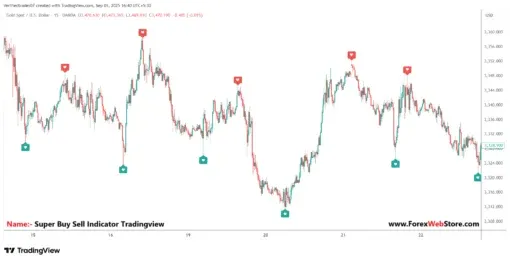
A solid scalping indicator should offer signals you can trust while you manage risk quickly. ForexWebStore MT4 focuses on a non-repainting design, which means the arrows aim to remain stable after they appear, rather than shifting as candles continue to form. Clear red and green arrows make it easier to interpret entries at a glance, even when you’re handling multiple trades or switching between pairs. For scalpers, clarity and consistency can be more valuable than complexity.
The arrow format also supports disciplined execution. Instead of guessing whether the latest candle is “about to confirm,” you can structure your routine around the moment the signal appears on the chart. This helps reduce emotional decision-making because your plan references the same visual cue each time. When you can quickly locate entry points, you can better manage spread effects and tighten your focus during active sessions.
How to Install and Use the Indicator with Scalping Rules
Start by downloading the indicator package from ForexWebStore MT4, then place the files into the proper MT4 folders. After you restart MetaTrader, check that the indicator appears in the Navigator panel and attach it to the chart you plan to trade. Ensure you compile or refresh if MT4 prompts you, because a clean installation prevents missing arrows or unreadable templates. For local traders, this step-by-step flow is important because it reduces the chances of chart errors when you’re ready to trade.
Once attached, apply a scalping workflow that matches the indicator’s intended behavior. The strategy targets entries when the red/green signal arrow appears, then aims for a quick exit typically around 15–20 pips depending on pair volatility. Use a consistent stop-loss placement and avoid moving targets without a reason, especially when you’re relying on fast signals. If your broker has variable spreads, factor that into whether you take every arrow or filter trades by session conditions and chart readability.
To make the approach practical, pick a couple of pairs you trade regularly and test how signals behave on them. For example, traders often monitor gold alongside one or more currency pairs, then compare how arrow frequency and follow-through differ. If you’re running multiple charts, keep your chart templates aligned so you interpret the arrows the same way each time. Local relevance improves because your charts reflect your own execution environment and habits, not a generic demo setup.
Choosing Pairs, Timeframes, and Risk Controls for Reliable Execution
Even with a non-repainting indicator, performance depends on your pair selection and how you control risk. Scalping tends to punish overtrading, so it helps to focus on instruments that offer enough movement to reach your target range. If a pair is too quiet, arrows may still appear, but the market may not travel far enough to justify the spread plus commission. For local traders, this means you should observe your preferred broker’s typical movement for the pairs you trade.
It also helps to align your chart settings with your execution speed. If you scalp on shorter charts, you’ll need quicker attention to candle structure, spread changes, and whether the arrow aligns with your broader bias. If you scalp across multiple timeframes, use a simple rule such as trading arrows in the direction of higher-level trend signals. Keep your lot sizing consistent and consider a maximum daily loss threshold so one rough streak doesn’t disrupt your entire routine.
Before going live, run a structured demo phase that emphasizes process over profits. Track which arrow colors you take, whether you enter immediately or wait for a confirmation behavior, and how your exit rules perform in different conditions. Then adjust your filters rather than changing the core plan every time results vary. With a stable visual system and clear rules, you can refine your local setup without turning each trade into a new experiment.
Conclusion
A local, streamlined MT4 workflow can make scalping more manageable, especially when you rely on rapid chart decisions. By using a non-repainting arrow-based indicator from ForexWebStore MT4, you gain clearer entry cues and a more consistent visual signal experience. That clarity supports disciplined execution, from installation to trade management. Traders who value speed and stability often find that instant access reduces friction and helps them stay focused on risk. If you want a practical starting point, build your routine around the red/green arrows, pair it with a defined stop-loss, and aim for quick exits in the typical 15–20 pip range. Keep your chart templates consistent, test on the pairs you actually trade, and filter trades when spreads or volatility make results less predictable. With careful setup and repeatable rules, the indicator can fit naturally into a local trading style without forcing you to relearn your process.